Restore Old Family Photos with AI — Without Changing Faces
Repair damage, fade, and scratches. Colorize black-and-white originals. Preserve the real faces of your ancestors — we don't hallucinate features like other AI tools do.
In one paragraph
AI photo restoration uses machine learning to repair damaged, faded, or torn photos and colorize black-and-white originals. MyLegacySpace uses Microsoft's Bringing Old Photos Back to Life model and DDColor for colorization — deliberately without face-enhancement models that hallucinate different facial features. Your ancestors stay recognizable. Free accounts get 3 restorations; paid plans include more.
Real example
Before and after
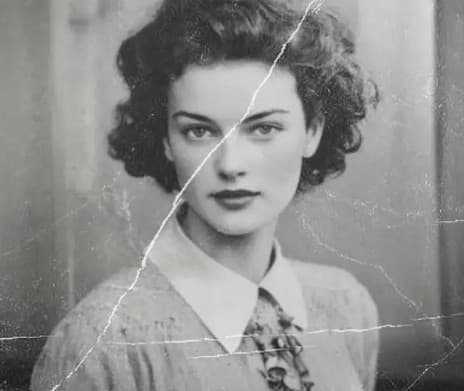
Before
Original scan: faded, damaged, and black-and-white.
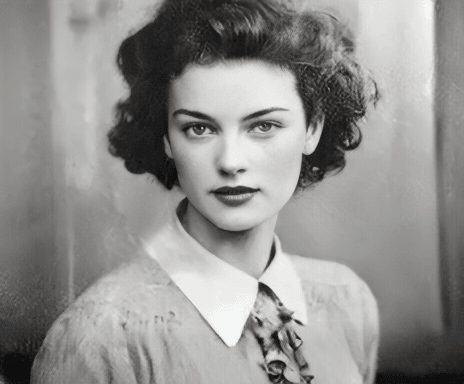
After
Damage repaired, colorized, and — crucially — the real faces left exactly as they were.
What is AI photo restoration?
AI photo restoration is the use of machine learning to repair damaged, faded, torn, or scratched photos — automatically. The best models also colorize black-and-white images. Unlike traditional editing, AI restoration works in seconds and requires no skill from you. You upload the photo, the AI returns a cleaned-up version.
Why we restore differently
We preserve real faces
Other AI tools use face-enhancement models that invent different facial features on group photos. We deliberately don't. Your ancestors stay recognizable.
Damage repair and colorization
Fix scratches, tears, water damage, and fading. Colorize black-and-white photos to see family in the colors they actually wore.
Free to try
3 restorations included on the Free plan. No credit card. Upload a real family photo and see what comes back before committing to anything.
Seconds, not hours
Each restoration takes about 30-60 seconds. No Photoshop skills required. No paying a retoucher $80 per photo.
How it works
- 1
Upload the photo
Drag and drop a photo from your computer, or scan an old print directly with your phone camera. JPEG, PNG, and HEIC up to 20MB.
- 2
Choose what to restore
Damage repair only, colorization only, or both. Preview the result in about 30-60 seconds. If you don't like it, try again with different settings.
- 3
Save it where it belongs
Attach the restored photo to a family member's profile, a memorial page, or simply download it to print and hang on the wall. Your original is always preserved.
Why MyLegacySpace
We tested face-enhancement AI models during development. They produced sharper, cleaner faces — but often invented entirely different facial features on group photos, turning your great-grandmother into someone who wasn't her. We removed them. Real family history deserves honest restoration, not AI-generated strangers.
Questions about AI photo restoration
- How does AI photo restoration work?
- AI photo restoration uses machine learning models trained on millions of photos to repair damage automatically. Our pipeline uses Microsoft's Bringing Old Photos Back to Life for damage repair and DDColor for colorization. You upload a photo, the AI processes it in about 30-60 seconds, and you get a cleaned-up version back — no editing skills required.
- Will the AI change facial features in my photos?
- No. We deliberately do not use face-enhancement models (like GFPGAN) because they hallucinate different facial features — often turning ancestors into people who aren't them, especially on group photos. Our restoration focuses on damage repair, colorization, and clarity while leaving real faces untouched. Honest restoration, not AI-generated strangers.
- Can you colorize black-and-white photos?
- Yes. Our colorization model (DDColor) adds historically-plausible colors to black-and-white photos — skin tones, clothing, backgrounds. You can run colorization alone, or combine it with damage repair on the same photo. Results typically look natural, though no AI colorization is perfectly accurate to the actual colors of the original scene.
- What photo formats are supported?
- JPEG, PNG, and HEIC (iPhone format) are supported. You can upload photos up to 20MB. For best results, upload the highest-resolution scan or phone photo you have — more pixels give the AI more detail to work with.
- Will restoration damage or overwrite my original photo?
- No. Your original photo is never modified. The AI creates a new restored version; the original stays exactly as you uploaded it. Both versions are saved, and you can download either one at any time.
- How many restorations are included on each plan?
- Free plan: 3 restorations total. Family plan: 10 per month. Legacy Pro: unlimited. Restoration is a compute-intensive process (each one costs us money to run), so monthly limits help keep prices fair for everyone.
- Can I scan old prints with my phone?
- Yes. Phone cameras work fine — just take the photo in good lighting with the print flat and avoid glare. Apps like Google PhotoScan can help automate that. Upload the phone photo directly to MyLegacySpace and the AI will handle the restoration.
Bring an old photo back — today
Pick a photo that matters. Upload it. See what AI can do in under a minute — for free, no credit card.